Hi! me again.
Twitch point integration.
Screen overlay: display a visual
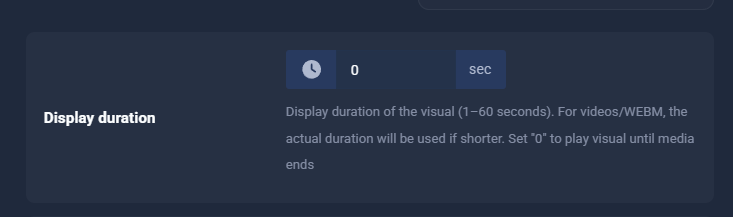
When using multiple video variations with different lengths, the Display duration setting creates a problem.
Example scenario:
-
Visual alert with multiple video variations (randomized)
-
Video A: 3 seconds
-
Video B: 5 seconds
-
Video C: 12 seconds
If I set Display duration = 5 seconds:
-
Video A plays for 3 seconds, then loops for 2 more seconds
-
Video C is cut off at 5 seconds
This makes it impossible to mix videos with different durations without unwanted looping or cutting.
Expected / logical behavior
Setting Display duration = 0 would logically mean:
“Do not use a fixed timer.
Play the video exactly once and hide the alert when the video ends.”
However, currently:
-
Setting Display duration to 0 still results in a ~5 second timer
-
Shorter videos loop
-
Longer videos are cut off
This behavior makes it impossible to use video variations of different lengths correctly.
Suggested improvement
Please consider adding one of the following options:
- Allow Display duration = 0 to explicitly disable the timer
→ Play video until it ends (no looping, no cutoff)
or
- Add a clear option such as:
“Play visual until media ends”
This would make video-based alerts with mixed-duration variations work correctly and intuitively.
Why this matters
-
Video alerts often vary in length (memes, reactions, short clips)
-
Enforcing a fixed duration breaks randomness and timing
-
The current behavior contradicts the expectation that “0 = no limit”
Thank you for your time, and I hope this feedback helps improve the alert system UX.
here an example:
And yes, I asked GPT to help me write that better for ya, coz I’m not so smart XD